Hilal Abdessamad, Ahmad Afyouni, Amarelle Chamoun, Lara Dalal, Macram Wakim, Ali Toufaily (Author)
Purpose: To summarize the literature on bacteriophage use in human infection
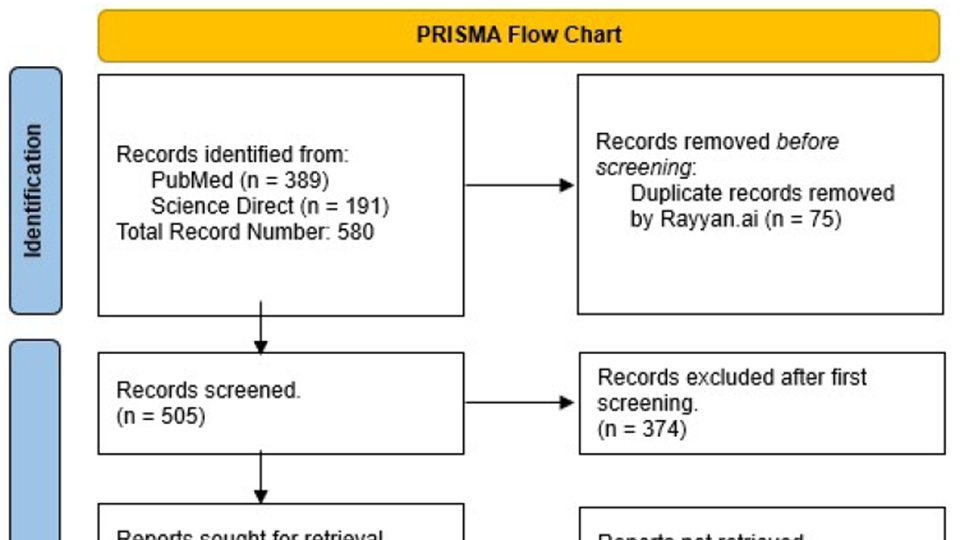
Methods: Using the MeSH terms “Phage” “Therapy”, “Treatment” “Outcome”, a search was performed in ScienceDirect, Scopus and Pubmed databases, including narrative review, systematic reviews and clinical trials, dating from 2020 till June 2023. A total of 191 articles and 389 articles were retrieved respectively from each database, which after duplication removal, added up to 505. After the primary screen, 131 texts were collected. Following that, a secondary ended up with 56 articles included.
Conclusion: With the constant increase in antibiotic resistance, there is a need for newer antimicrobial agents, which led to the revival of bacteriophages. Due to advances in molecular microbiology, phages became a possibility that has proven itself promising. More studies and funding are needed towards this field, that offers us a promising salvation from the antimicrobial resistance pandemic.
Introduction:
Bacteriophages, which are viruses that selectively infect bacterial cells, are ubiquitous in the environment and exhibit extensive morphological and genomic diversity 1. They possess basal plates with tail fibers that facilitate their initial attachment to host cells and introduce their genetic material via the sheath region. Bacteriophages follow a lytic or lysogenic life cycle within host bacterial cells, with the former resulting in the lysis of the host cell and the latter leading to the persistence of the bacteriophage in a latent state. Environmental cues, such as pH, nutrients, temperature, or exposure to antibiotics, can trigger prophages to enter a lytic cycle and the lysis of the host cell 1. Lytic bacteriophages are gaining popularity as a treatment for antibiotic-resistant bacterial infections, particularly the challenging 'ESKAPE' (Enterococcus faecium, Staphylococcus aureus, Klebsiella pneumoniae, Acinetobacter baumannii, Pseudomonas aeruginosa, and Enterobacter species) pathogens 1.
The “ESKAPE” pathogens are both Gram negative and positive species that are significant contributors to hospital-acquired infections, some of which are fatal 1. A recent study done by the US center for Diseases Control and Prevention, showed that we have roughly 51,000 health care associated infections reported to be caused by P.aeruginosa every year, 13% of these infections are MDR causing about 400 deaths per year. P.aeruginosa is found to have an increasing number of strains that are MDR without any effective antibiotic to stop this bacterium 2. The ESKAPE pathogen's capacity to evade the antibacterial effects of traditional antibiotic treatment renders the conventional therapy with antibiotics progressively less effective over time and raises the eminent need for alternative therapies, one of which is phage therapy 3.
One application of phage therapy aims to target bacterial biofilms, which are a significant contributor to the antibiotic resistance of ESKAPE pathogens. In a study of 15 A.baumannii isolates, lytic phage reduced bacteria by 87%, indicating potential for breaking down biofilms on medical devices 4. However, phage treatment was not completely effective against all isolates, so combining multiple phages or phages with antibiotics may be necessary for optimal results 4. The "seesaw effect" is another mechanism of action observed in phage therapy. Here, induction of phage resistance leads to regained antibiotic susceptibility, highlighting an interesting evolutionary genetic trade-off. This suggests that using a combination of antibiotics and phages may be a beneficial approach when dealing with these superbugs 2.
Phage therapy aims to provide personalized clinical treatment for patients. Successful trials include a 68-year-old patient with diabetes and necrotizing pancreatitis, and 4 severely ill COVID-19 patients with A.baumannii infection. Both trials showed positive results with complete resolution of A.baumannii infection demonstrating the significant potential of phage therapy for personalized or commercial use 5,6. Similarly, case reports have shown the clearance of P.aeruginosa using phage therapy in several types of infections and has also been able to prove the safety of this therapy in a randomised, double blinded placebo-controlled clinical trial 7. Moreover, trials on bacteriophage therapy against acute and chronic S.aureus infections resulted in complete resolution of the diseases in 40% of patients after bacteriophage monotherapy, with better results (70%) after bacteriophage/antibiotic combination treatment 8.
The main obstacle in evaluating the effectiveness of phage therapy in clinical settings is the limited number of trials due to the lack of regulations and safety guidelines, which prevent physicians from using them 9. Amongst the studies that were conducted, some notable limitations include a decreasing susceptibility to the phage over time, requiring multiple doses which was seen in the previously mentioned diabetic patient 5. Certain limitations are associated with the pathophysiology of specific pathogens, such as K.pneumoniae, which can reside inside cells within vacuoles, making it inaccessible to bacteriophages 10. Another is the development of anti-phage antibodies after oral phage therapy, which can reduce the efficacy of lytic phages. This was observed in patients with A.baumannii, K.pneumoniae, or P.aeruginosa infections after 2-3 weeks of phage therapy. Repeated phage treatment resulted in higher antibody levels, but its impact on phage therapy effectiveness requires further investigation 11.
Bacteriophage therapy is superior to antibiotics usage as they generally possess self- replicating properties, selective targeting of a host, and lower side effects.1 Phage therapy can be utilized alone or in conjunction with antibiotics, and has demonstrated both efficacy and safety in clinical trials. However, certain limitations regarding clinical use and research remain, all of which will be discussed in detail in our review.
This review is expected to provide a better understanding of phage therapy against ESKAPE organisms in terms of its effectiveness, indications of use and its anticipated side effects, by critically analyzing the existing literature and providing a comprehensive overview of this topic, in addition to identifying the current gaps in literature and providing new insights for future research for bacteriophages as a promising alternative to antibiotics in the treatment of bacterial infections.
Methods
This study reviewed the current knowledge regarding phage therapy in ESKAPE organisms, with particular emphasis on clinical indications, as well as therapeutic outcomes and side effects. In order not to exclude any important clinical article, a search strategy using the following principal MeSH terms was created: Phage Therapy, Treatment Outcome. The search was limited to ScienceDirect, Scopus and Pubmed databases, including narrative review, systematic reviews and clinical trials, dating from January 2020 till June 2023. A total of 191 articles and 389 articles were retrieved respectively from each database, which after duplication removal, added up to 505. Articles found in Scopus were duplicates from pubmed so they were automatically excluded. A primary screen was done through the article abstracts and title, and a total of 131 texts were collected. Following that, a secondary screening through the entire text was conducted, with a total of 56 articles were eventually included in the review.
Study design:
Narrative review
Inclusion criteria:
● Articles tackling MDR bacteriophage therapy for infections caused by ESKAPE microorganisms since the year 2020
Exclusion criteria:
● Articles in foreign language
● Phage therapy in the context of oncologic & inflammatory non-infectious conditions
● Studies dealing with non-human subjects
● Studies done in laboratory settings (in-vitro)
Results:
Part I: General Overview:
Multidrug resistant bacteria are becoming a major problem that the healthcare system is facing. Bacterial infections are slowly switching from curable to deadly diseases due to resistance 12. ESKAPE organisms are known to have different virulence factors and resistance abilities that makes them difficult to treat. As these bacteria continue to develop resistance to almost all known antibiotics, shifting towards non-antibiotic interventions becomes a pressing need 13.
Bacteriophages are types of viruses that are known to infect bacteria 14. In the 1900’s, bacteriophage-based therapies were discovered and did show positive results for treating bacterial infection 14. D'Herelle's groundbreaking work in 1917, leading to the first application of phages as therapeutic agents in 1919 15. Back then, antibiotics were the most successful and safest agents available 14. The rise of antibiotics, providing a more convenient way to manage infectious diseases, overshadowed the phage therapy approach 15. Consequently, phage therapy was largely abandoned globally, except in a few countries like Georgia, Poland, and Russia, where it continued to be an approved treatment for specific bacterial infections 15. With the resurgence of interest in addressing bacterial infections, particularly due to multidrug resistance, there is a renewed focus on phage therapy as a potential solution 15.
Being easily accessible with an acceptable safety profile, people misused antibiotics, leading to widespread antibiotic resistance. As this issue continued, pan-drug resistant organisms emerged and resistance became a global public health concern, persuading research to go to non-antibiotic agents to treat them 12.
In fact, phages have been extremely effective against several types of infection, regardless of the pathogen itself. This is due to their ability to multiply specifically, which means that a lower therapeutic dose is needed to overcome the infection 16. In addition, resistance develops about ten times slower than antibiotic resistance 16. Our ability to genetically engineer viruses, provides us with a tool that can kill bacteria safely and effectively without many side effects that are seen with antibiotics 13.This is especially important in respiratory infections for example, that are a leading cause of morbidity and mortality 17.
Nowadays, we can find numerous formulations for bacteriophage therapies, such as isolated purified phages, phage lysates, phage cocktails consisting of multiple distinct, and nanoparticles encapsulating phages for controlled release, along with phage-derived enzymes 15. The search for such alternative treatments gained traction from the 1980s to 1990s with antibiotic resistance, and phage isolation became a focal point for potential treatment options. However, challenges such as inadequate phage characterization, lack of controlled trials, and economic factors in assessment locations have hindered conclusive evidence of phage therapy's effectiveness 18.
The cost of basic medical care is a significant concern in developing countries, exacerbated by the expense of acquiring effective antibiotics to combat antibacterial resistance 18. The potential of phage therapy in these areas is considerable, where infectious diseases cause millions of deaths annually. Phages could serve as a locally produced remedy, addressing antibiotic limitations and cost barriers 18.
In recent years, the acceptance and application of phage therapy have increased in Western countries, paralleling Eastern countries where phages have been used clinically 18. Successful cases include patients infected with multidrug-resistant Acinetobacter baumannii and Pseudomonas aeruginosa. However, challenges have emerged, such as phage resistance and technical complexities in phage preparation 18.
Part II: Advantages and Ease of Phage Utilization:
Specificity
There are several advantages of using therapeutic bacteriophages. For instance, phages exhibit a high degree of specificity, targeting only the harmful microorganisms while leaving beneficial microflora untouched 15. They are highly specific to their target bacteria and don't harm mammalian cells 3. They usually target specific bacterial hosts based on the presence of complementary receptors on the bacterial surface 19. This specificity is advantageous as it allows for a narrow spectrum of action, reducing the impact on beneficial gut microbes and the development of secondary infections and antibiotic resistance 19. Studies have shown that phage therapy can be administered without disturbing the normal gut microbiome 19. This specificity contrasts with antibiotics that affect a broad range of bacteria, reducing the risk of complications like dysbacteriosis and secondary infections 15.
Self-Replication
Bacteriophages have a unique mechanism of action that allows them to lyse host targets and produce more phage copies, eliminating the need for repeated dosing or administration to maintain therapeutic concentration 19. This enhances their local antibacterial impact compared to antibiotics which require multiple dosing 15 19.
Side Effect Profile
Ad El Haddad et al. also demonstrated that administration of phages was generally well-tolerated, with no instances of adverse effects or toxicity reported 20. This was supported by many clinical trials 19. In addition, Phages have immunomodulatory properties, inhibiting inflammatory cytokine production and maintaining immune tolerance 19. Phages are generally safe when manufactured under Good Manufacturing Practice (GMP) guidelines, removing endotoxins and debris 21. Concerns arise from bacteriolysis events during phage administration, thus optimal dosing is crucial to prevent excessive cell wall fragmentation and cytokine increase 21. Al-Ishaq et al. reviewed studies demonstrated that various phage cocktails or individual phages were highly effective against pathogens and were considered safe, with no reported side effects 11.
Resistance
Resistance development, a major concern with antibiotics, is less problematic with phages due to their ability to coexist with bacteria and evolve to counter resistance 3. Even phage-resistant bacteria remain susceptible to other phages, and the process of introducing new phages is faster and more cost-effective compared to developing new antimicrobials according to regulations 15. Phages can reach infection sites effectively since they reproduce in the presence of their host bacteria and spread throughout the body when administered systemically 3. They can even penetrate areas like the blood-brain barrier, which may be inaccessible to drugs. Some phages can also disrupt biofilms. This growth behavior might allow for less frequent and lower treatment doses compared to antibiotics 3.
Fighting Biofilms
Some microbial agents produce biofilms, which makes them possess unique properties and resist conventional treatment methods 19. While antibiotics have limited effect against biofilm bacteria, bacteriophages have proven highly effective in eradicating them 19. Bacteriophages can infect and lyse biofilm-forming bacteria, degrade the EPS matrix, and penetrate through water channels within the biofilm structure 19. This is why phage therapy shows promise in treating persistent infections caused by biofilm formation on implanted medical devices 19.
The use of bacteriophages for biofilm degradation is limited by their high host specificity. A phage can only eliminate its target bacterial species within a biofilm community, which is often composed of multiple bacterial species 19. While a cocktail of bacteriophages could be a solution, an alternative approach is the use of polyvalent phages with broad or multiple host ranges 19. Studies have shown the effectiveness of polyvalent phages in lysing mixed biofilms consisting of different bacterial species 19. This opens up opportunities for the expanded use of polyvalent phages in biofilm degradation, and there are numerous studies exploring their application in the literature 19.
Cost Effectiveness
Miedzybrodski et al. conducted a study involving six patients with antibiotic-resistant infections and compared the economic benefits of phage therapy with antibiotic therapy. The patients received oral phage preparation for 6.5 weeks, and the total cost of treatment was approximately 524 EUR 19. In comparison, the total cost of a ten-day course of vancomycin, linezolid, and teicoplanin ranged from 344 EUR to 2,620.85 EUR. Based on this analysis, the authors concluded that phage therapy was more cost-effective than antibiotic therapy for these infections 19.
Chances for synergistic effect
Applying a magnetic field can disrupt the chemical agents that hold microbial biofilms together 19. Studies have shown that antibiotics and magnetized bacteriophages can effectively penetrate and inhibit the growth of biofilms 19. This opens up new possibilities for using magnetic fields as an adjunct to antibiotic therapy and for applying bacteriophage therapy to eradicate drug-resistant bacterial infections caused by biofilm accumulation 19.
Effective on Multi-Drug Resistant (MDR) bacteria
Importantly, many of the bacterial strains used in the studies were resistant to commonly used antibiotics, making phage therapy a valuable alternative 11. In most cases, phages effectively reduced bacterial concentrations, improved outcomes, and provided protection against lethal infections or degraded biofilms 11.
Antibiotic resistance can be decreased and improved antimicrobial effects are possible using phage-antibiotic therapy. According to studies, using phages in combination with antibiotics results in a lower antibiotic MIC, which helps remove biofilm 22. The best concentration of each antibiotic in a combination varies, though. Simultaneous administration produces synergism for aminoglycosides but not ciprofloxacin, demonstrating antibiotic class-specificity 22. Sequential delivery, for example with aminoglycosides, improves phage multiplication and bacterial death. The features of the host strain affect treatment effectiveness; antibiotic administration time and sequence affect synergistic effects. Due to phage specificity and antibiotic pharmacokinetics in physiological conditions, phage-antibiotic interaction results differ 22.
Besides, bacteria may forgo virulence in favor of phage resistance, which could have positive effects including decreased antibiotic resistance and improved sensitivity to both phages and antibiotics. Recent research suggests that antibiotic susceptibility may increase in phage-resistant mutants, offering a technique to take advantage of bacterial weaknesses for effective phage therapy 23.
Already Used and Proven Effective in Some Places
In Egypt, Georgia, and the UK, phage therapy has shown promise in improving wound healing and recovery 24. Belgium also introduced a framework accepting phages as pharmaceutical ingredients 21. Phage potential to strengthen immune systems, lower bacterial loads, and treat pyoseptic issues in burn wounds has been demonstrated in clinical trials 34. Additionally, phages help wounds heal, fight off bacterial biofilms, and have transplant-safe immunosuppressive qualities 24. The benefits of phage therapy include its efficacy against drug-resistant germs, selectivity, and lack of hazardous side effects 24. Accurate agent identification, intracellular pathogen targeting, and routine phage efficacy monitoring present difficulties. Phage therapy offers a targeted and promising infection treatment strategy despite its difficulties 24.
Support of Normal Flora Diversity
The gut microbiome is significantly impacted by phage therapy. Phages support microbial diversity and guard gut mucosal surfaces 25. They can target problematic bacteria without disrupting the normal microbiome thanks to their restricted spectrum. According to research, phages may have an impact on diseases like diabetes and inflammatory bowel disease 25. However, it is unclear how they play a part in disease pathways. The effectiveness of fecal microbiota transplantation for illnesses like Clostridium difficile infection also appears to be influenced by phages 25. Phage therapy's effects on the gut flora and potential health advantages require further study 25.
Effective Prototypes
Modified S. carnosus phages, from an avirulent strain containing none of the virulence genes of S. aureus phages that could compromise the safe production of phages for therapeutic use, showed a wide host range, with rapid killing, high efficiency in reducing the formation of biofilms, and the prevention of appearance of resistant mutants, with only a small initiating dose required 26. Isolated lytic MRSA bacteriophages were shown to have wide host ranges, wide range of temperature, pH and still active at 2.5 kGy doses of gamma radiation, and forcing the MRSA strains to be sensitive after combination with vancomycin and erythromycin 27.
Part III: Disadvantages and Ease of Phage Utilization
The limitations of phage treatment can be broken down into three main categories: the effect of the phage's special qualities, the absence of suitable regulations, and standards, and the challenges with clinical applications 24. An ideal bacteriophage for therapeutic use should have good environmental adaptability and stability, be devoid of endotoxin genes in the genome, be easy to separate from other bacteriophages and to purify, and not harm the host 34.
Lack of Adequate Research
Despite the benefits of bacteriophage use, we still need to combat several difficulties to unlock their full potential. Clinical research and protocols for administration, dosage, frequency, and treatment duration are often lacking so far 3. The number of clinical trials assessing the safety and indications of phage therapy in humans is very limited, and those that have occurred have involved small sample sizes and have relied on data generated by patients 9. The lack of appropriate legal and regulatory frameworks poses a significant challenge to integrating phage therapy into conventional medicine 3.
Side Effects
Antibiotics are known to have many side effects, but these effects are known, unlike those related to phage treatment 19. One very important hazard with phages is the risk of anaphylaxis due to the innate ability as viruses to induce an immune reaction 28. Viruses themselves can directly affect the immune system, triggering innate and adaptive responses 22. In addition, emergence of phage-neutralizing antibodies could hinder their effectiveness, as observed in some cases after parenteral administration 3. Other studies find the implications for such outcomes ambiguous 21.
Besides, phage therapy can increase intestinal permeability and induce intestinal barrier dysfunction. Safety concerns in immunocompromised patients remain, but available literature suggests that phage therapy may be safe and effective for this population 19. Furthermore, phage-induced bacterial lysis can result in a rapid release of endotoxins, which may result in inflammatory reactions. It's crucial to keep track of the microorganisms present in phage preparations 22.
Toxicity
A lot of chemical excipients used with phage manufacturing can have their toxicities 29. Preparation often requires purification, often involving cesium chloride (CsCl), which is toxic 29. It is removed by anion exchange, which works well for smaller-scale purification22 .Although typically removed from clinical preparations, safer alternatives like polyethylene glycol, which are not free from toxicity, are used to mitigate risks 29.
In addition to chemical toxicity, bacterial proteins and endotoxins present phage preparations may cause inflammation and hypotension. This is because when phages are prepared in the lab, bacteria are used to replicate them. For safety, it is essential to quantify toxin and bacterial particle presence 22.
Bacterial Resistance
Furthermore, bacteria can as well develop resistance to phages 30. Phages have the capacity to apply considerable evolutionary pressure on bacterial populations, prompting genetic alterations that lead to resistance 15. For instance, bacteria can employ diverse mechanisms to counteract phages, such as modifying their outer membranes, generating inhibitors that impede phage replication, or modifying the sites that phages target for infection 15. For example, P. aeruginosa can generate proteins that neutralize phage activity, enabling bacteria to flourish even in the presence of phages 15. Phage therapy typically involves using multiple phages to minimize resistance. Lysogenic phages, which incorporate their DNA into host bacteria, can potentially contribute to horizontal transfer of resistance genes19. However, lysogenic phages can also be modified to convey antibiotic-sensitive genes, offering a potential avenue for restoring antibiotic sensitivity in resistant bacteria 19. Nevertheless, phages can be used by bacteria as vectors to transmit their antibiotic and phage resistance genes via genetic transduction, which can further spread resistance against them 28.
Host Specificity and Polymicrobial Infection
The host specificity of phages can also be a limitation, particularly in polymicrobial infections and when broad-spectrum treatment is required 19. Large-scale production and distribution of phage-based therapeutics can be challenging due to regional specific epidemiology, as phages may be most effective when matched to the local microbial population 19. Understanding the regional specificity and targeting phages to prevalent antibiotic-resistant strains can improve the efficacy of phage therapy 19.
Logistics
Raising awareness of phage safety and efficacy is vital for clinical acceptance. Manufacturers must adhere to Good Manufacturing Practice guidelines to ensure phage stability from production to administration 20. Phages' personalized nature requires a distinct approach from traditional medicines, with considerations for quick updates in response to bacterial resistance 20. Phages also need for specialized expertise to administer them 15.
Ideally, phage therapy offers a potential solution in the fight against multi-drug resistant bacteria in low-income countries, as effective and affordable alternatives to the very expensive and often unavailable antibiotics 19. However, limited financial resources, lack of political will, and regulatory limitations hinder the exploration of phage therapy in Africa 19.
The adoption of phage therapy into conventional medicine faces regulatory hurdles due to the lack of a global framework. Its position as a personalized medicine approach challenges existing pharmaceutical regulatory policy 19. Issues related to intellectual property rights for phage therapy medicinal products (PTMPs) arise because natural bacteriophages cannot be patented, creating challenges for commercial production of phage cocktails 19. The need for market authorization for PTMPs is unclear, as some argue that they are formulated for specific patient use, while others require industrial-scale production 19. Additionally, the unique pharmacodynamic properties of phages as "active drugs" and their potential for self-replication in the body raise additional considerations 19. However, there is still much to learn from countries that have not abandoned phage therapy, particularly regarding research, development, policy, and legal considerations, if phage-based therapeutics are to be integrated into modern medicine 19.
Examples from the Literature
There are several case reports of unfavorable outcomes with phage treatment. One report discusses the development of reversible transaminitis in a patient with chronic methicillin-resistant S. aureus prosthetic joint infection following phage therapy was probably caused by underlying steatosis and cytokine response 31. Another describes a diabetic patient with necrotizing pancreatitis and Acinetobacter baumannii infection temporarily required more vasopressors following phage therapy, but things got better after phage therapy was resumed 22. During phage therapy, a child with P. aeruginosa bacteremia experienced anaphylaxis-related decompensation, possibly because of developing heart failure or endotoxin release 22. There is also a case of a patient with P.aeruginosa UTI who experienced fever and chills during phage therapy due to endotoxin release and the antibiotic regimen had to be changed 22.
There are also many clinical trials involving phages. Phage therapy's safety was examined in trials for a variety of illnesses, including endocarditis, UTIs, venous leg ulcers, chronic otitis media, and more 22. A study in which healthy persons consumed E.coli phages revealed no changes in the amount of IL-4 in the blood, decreased fecal E.coli burdens, and no significant changes in the gut microbiota 22. In another study, healthy volunteers were given a broad-spectrum phage cocktail and experienced back discomfort, gastric acidity, allergic rhinitis, and low-grade fever 22. The PhagoBurn burn wound clinical trial examined phage therapy for burn wounds infected with P. aeruginosa. When a phage cocktail was given to the wound, the outcomes were disappointingly poor; this may have been because the phage dose was less than what was intended 23.
Possible antagonistic effect with antibiotics
Contrary to expectations, antibiotics like streptomycin caused bacterial resistance to phages 22. This is not only limited to streptomycin, as any antibiotic that interferes with protein translation and synthesis can stop the phage replication inside bacterial cells as well, limiting the awaited therapeutic effect 32.
Part IV: Administration Route and Dosing
The form and route of phage administration is a critical consideration for accurate dosage calculation 20. Some phages are used as ointments on wounds and burns. For that, gel applications have shown better outcomes in comparison to sprays 20. Oral delivery is challenging due to destruction in the stomach due to high acidity, but techniques like gastric fluid neutralization and capsule formulations can enhance absorption33. Intravenous administration is theoretically efficient but may trigger immune responses leading to fever or other constitutional symptoms 20.
Current phage therapies don't have standardized formulations and are instead individualized. There are various methods, like as genetic engineering, phage bank expansion, and phage cocktail and antibiotic fusion 22. Although the development of topical and inhalable medications shows promise, there are still issues with dose, kinetics, and stability 22. The main challenge here is that phages are able to self-replicate, but if administered in low doses, bacteria can quickly resist them before they can overwhelm bacteria with their numbers. Besides, higher doses can have more side effects 33.
Due to the synergistic effect of some antibiotics and phages, usage of such combos can be utilized to decrease the needed doses of both the phage and the antibiotic. However, it is worth mentioning that just as there exists no universal dose for all antibiotics, phages are very variant and no single dosing regimen fits them all 34.
Part IV: The Emerging Problem of Multi-Drug Resistant Organisms (MDROs)
As mentioned before, MDR emergence is a major challenge in infectious diseases. Pneumonias remain the most common cause to infection-relate mortality 35. The risks of death from pneumonia are augmented by antimicrobial resistance, especially in hospital-acquired and ventilator-associated settings 36.
Solid organ transplant and hematopoietic stem cell transplant (HSCT) recipients are highly susceptible to infections and colonization by multidrug-resistant (MDR) pathogens. These MDR pathogens contribute to recurrent hospitalizations and infections, leading to a higher use of antibiotics 37. Bacterial prostatitis is also becoming harder to treat due to resistance 38.
The prevalence of MDR infections becomes major in the transplant population, with resistance can range from 14% in kidney transplant to 51% in lung transplant recipients 37. In HSCT patients, the prevalence of MDR pathogens can also reach up to 50%. These infections are associated with increased mortality and graft loss in transplant recipients 37.
COPD and cystic fibrosis predispose to a infections that can be life-threatening and quickly gain resistance 39. These patients have high rates of colonization (up to 73%) with multidrug-resistant (MDR) pathogens, including Pseudomonas aeruginosa and Staphylococcus aureus 37. Besides, Burkholderia cepacia complex (BCC) species and Mycobacterium abscessus are associated with high rates of resistance 37. Lung transplantation is often contraindicated in patients with BCC or M. abscessus infections due to the high risk of recurrence and mortality 37. As these diseases become harder to combat, we move towards the “post-antibiotic” era” 12.
A newly growing population, patients with ventricular-assist device (VAD) implantation have very frequent infections approaching 33% pr cases, often caused by Staphylococcus aureus and Pseudomonas aeruginosa37.
Part V: Diseases with Phage Success:
Phages offer a good antibiotic alternative, or antibiotic synergistic factor to help combar MDROs. For example, upon the oral administration of phage three times in individuals affected by bronchopneumonia empyema, 82% showed full recovery with a negative culture 8. The pressing need for rapid access to phage therapy in critically ill patients has prompted the initiation of compassionate use case studies in Western countries 21.
It is known that phages can exist in their lytic or lysogenic phage and that they can both replicate in the targeted pathogen 40. Although both cycles can infect the bacterial host, only the lytic phage is used as “the phage therapy”, where the virus binds to the bacteria, injects its genetic material and replicate inside it until it bursts 40. Combining various phages with antibiotics to enhance their effectiveness against multidrug-resistant (MDR) bacteria and biofilms has gained significant attention. This strategy aims to augment antibiotic action by utilizing the phage ability to break down the extracellular polymeric substances (EPS) of biofilms and increase their permeability, enhancing antibiotic efficacy41.
Tkhilaishvili et al. demonstrated that bacteriophages, administered alongside antibiotics, successfully inhibited MDR P. aeruginosa biofilm in a patient with diabetes, joint infection, and osteomyelitis 41. In another study, the combination of phage PEV20 and ciprofloxacin was employed to combat P. aeruginosa biofilm sourced from wound and cystic fibrosis patients. The study revealed that the joint application of antibiotics and phages exhibited superior biofilm eradication compared to the use of ciprofloxacin alone 42.
Furthermore, phages are stable and can be stored at room temperature for months. They can survive stomach acidity, making them useful for treating intestinal colonization by bacteria like E. coli, Salmonella, Campylobacter, and Helicobacter 3.
Many factors must be taken into account to optimize therapeutic outcomes. The patient's clinical status should guide the treatment duration, especially for those with multiple co-morbidities 20. For instance, patients with conditions such as diabetes mellitus, cystic fibrosis, obesity, smoking habits, or compromised immune systems might necessitate extended treatment periods 20. The severity and type of infection also play a role in determining treatment duration. Smokers, for instance, may require up to 18 weeks of phage therapy compared to non-smokers who might only need less than 4 weeks. However, immunocompromised patients might develop bacterial resistance after a few weeks of phage therapy, as observed in a lung transplant recipient with Pseudomonas aeruginosa pneumonia 20.
Understanding Phage-Antibiotic Synergy (PAS) is pivotal for leveraging bacteriophage therapy in eradicating difficult to treat infections like osteoarticular infections 43. PAS has been demonstrated to curb the development of multi-drug resistant organisms by employing bactericidal mechanisms 43.
There have been reports of successful outcomes in cystic fibrosis and lung transplant patients with MDR infections when treated with bacteriophage therapy in addition to systemic antibiotics 37. Case reports have also shown the safety and probable efficacy of intravenous bacteriophage therapy in pretransplant and posttransplant settings, with some patients also receiving nebulized phage 37.
Some reports highlight successful outcomes in the treatment of extended-spectrum β-lactamase-positive Klebsiella pneumoniae infections 37. In one case, a kidney transplant recipient with recurrent urinary tract infection and epididymitis was treated with a combination of phages, administered orally and directly into the bladder via a urinary catheter for 12 weeks, alongside antibiotics. Another case involved a nontransplant recipient with a recurrent UTI caused by an extensively drug-resistant K. pneumoniae strain 37.
Phage therapy also shows promise in treating infections in burn patients, by tackling problems brought on by bacteria that are resistant to antibiotics 24.
Many other case reports on successful phage treatments exist. P. aeruginosa bacteremia was detected in a youngster who had Pseudomonas sepsis, where a phage cocktail was used when antibiotics proved ineffective to lessen the infection in the blood but not completely eradicate it 23. In another report, multiple phage cocktails were utilized in a case of necrotizing pancreatitis caused by an MDR A. baumannii-infected pseudocyst. A novel mixture proved successful in treating the infection over a 12-week period despite the emergence of resistance 23. P. aeruginosa was also targeted in an aortic graft: This infection proved resistant to conventional therapy. The local administration of ceftazidime along with phage OMKO1 successfully resolved the infection 23.
Successful cases show how well phage treatment and antibiotics work together. Using a phage cocktail and trimethoprim-sulfamethoxazole, a patient with a UTI caused by the highly drug-resistant Klebsiella pneumoniae was able to get rid of the infection and avoid recurrence for six months 44. Similarly, a Georgia phage in combination with meropenem successfully treated an infection in a renal transplant patient, resulting in symptom relief and a year-long recovery.
Depending on the kind, different phages and antibiotics interact differently. 44. S. aureus phages can also be used as a coating on prosthetic medical devices, in combination with antibiotics, as anti-biofilm formation strategies 45.
Clinical trials have also been conducted on this topic. The Otitis Clinical Trial started in 2009 showed that phage treatment for persistent P. aeruginosa otitis dramatically lowered bacterial counts after treatment for 23 days. No significant adverse events were seen, and safety was established 23.
In another trial in Bengladesh, phage mixtures were used to treat pathogenic E.coli in cases of diarrhea and failed to show benefot. The low-pH stomach environment may have an effect on viral viability, 23.
Part VIL: Real Life Applications
In a systemic review published in 2022, from 27 chosen studies that encompassed a patient cohort of 165 individuals, the analyzed data showed that 85% of cases exhibited decreased bacterial loads or complete eradication, coupled with improved clinical indicators, while 15% (24 cases) saw no positive impact from Phage Treatment (PT). A mere 21% (35 patients) underwent combined PT and antibiotic treatment, achieving a 100% success rate. Among the remaining 79% who exclusively received PT, the success rate reached 81%. Notably, within the 27 examined studies, 6 reported instances of bacterial resistance to phages 46.
In another review, 5 randomized clinical trials were included. One focused on chronic otitis where BT yielded significant positive clinical results 29. The other trials suggested that the bacteriophage concentration might have been too low to trigger a significant therapeutic effect, raising the need for dose optimization 29. Additionally, two trials exploring topical bacteriophage use yielded discouraging results due to phages' susceptibility to environmental factors 29. Variations in phage variants, conditions, concentrations, and approaches in these trials make it challenging to draw definitive conclusions about bacteriophage efficacy 29.
The effectiveness of phage therapy relies heavily on selecting precise bacteriophages for individual bacterial species and strains due to their host cell specificity. This necessity underscores the need for extensive phage libraries to tailor treatments accordingly 46.
Phages carry diverse proteins crucial for their replication cycle, encompassing functions from host recognition to cell lysis 47. Among these, phage-encoded proteins like receptor binding proteins, Virion-associated peptidoglycan hydrolases (VAPGHs), endolysins, anti-CRISPR proteins, spanins and holins are being explored as potential tools to combat antibiotic-resistant bacteria 47. The effectiveness of phage-encoded proteins as therapeutics relies on their serum half-life, with longer half-lives generally considered preferable 47. Besides, safety and cost-effectiveness are important considerations throughout the production process, including host selection, endotoxin removal, and regulatory approval 47.
The proper selection of phages for clinical application emerges as a pivotal factor in the success of phage therapy. This selection process is influenced by factors such as the type of infection, the timing of treatment, the patient's clinical status, and the attributes of the phages themselves 20. The reviewed studies underscore that appropriate phage selection is an essential consideration for successful clinical phage therapy. Effective phages should possess traits such as safety, strict lytic behavior, polyvalency, stability, ability to replicate within the host, and compatibility within phage cocktails to curb bacterial resistance 20. The absence of significant side effects in the reviewed studies can be attributed to the inherent composition of phages, primarily composed of DNA and proteins that do not provoke allergic or toxic reactions in humans, and their targeted specificity towards specific bacteria 20. Ensuring phage purity and appropriate dilution further enhances their safety profile by eliminating potential immune reactions and constitutional symptoms arising from bacterial lysates or toxins 20. Moreover, the risk of virulence or drug resistance genes within phage genomes is mitigated by employing naturally occurring, strictly lytic phages, as they lack integration with bacterial genomes and the dissemination of harmful genes 20.
Industrial-scale phage production requires standardized methods and regulatory frameworks lack global consensus 18. Raising awareness about phages' natural presence, safety, and potential efficacy is therefore crucial. Manufacturers must follow protocols, and regulations should ensure phage stability 18.
To address resistance, genetically engineered phages are being developed to enhance effectiveness and decrease immunogenicity 43. Notably, the US FDA has approved phage therapy under the "Emergency Investigational New Drug Scheme," with the European Medicines Agency considering genetically modified phages as advanced therapeutic medicinal products 43. Purification and dilution methods further enhanced phage safety by removing bacterial toxins and lysates 11. To ensure phage stability, it is crucial to use strictly lytic phages that do not carry resistance genes 11. Genome sequencing can help identify the presence or absence of resistance elements, guiding appropriate phage selection 11. Genetically engineered phages offer customization options, and they have demonstrated efficacy in reducing bacterial titers. In cases of phage resistance, the use of polyvalent phage cocktails in alternation can be considered 11.
The administration of compassionate phage therapy typically involves a collaborative approach, bringing together experts from various fields, including infectious disease specialists, microbiologists, phage biologists, and pharmacologists 21. A standardized protocol for phage selection, production, purification, dosing, and treatment methods could immensely facilitate the broader implementation of compassionate phage therapy on a global scale. This would streamline the process and provide more uniform and effective treatments for critically-ill patients 21.
Topical phage products have emerged as some of the first to reach the market, with Gladskin (lysin SA.100) by Micreos gaining approval from the European Medicines Agency 21. Gladskin targets S. aureus for treating skin conditions like eczema, rosacea, psoriasis, and acne 21. Micreos is also developing endolysin XZ.700 for atopic dermatitis. iNtRON Biotechnology completed a phase I clinical study for intravenous N-Rephasin SAL200, demonstrating its tolerability and safety 21. The endolysin exebacase CF-301 by ContraFect is being evaluated in COVID-19 patients with persistent MRSA bacteraemia, showcasing its effectiveness against a broad range of S. aureus isolates, including biofilms 21.
Combination therapy, involving the use of both antibiotics and phage therapy, has shown synergistic effects in treating bacterial infections 11. Sublethal concentrations of antibiotics can enhance the production of lytic phages, leading to faster destruction of bacterial cells 11. In the reviewed studies, combination therapy was tested for S. aureus infections, with one study including P. aeruginosa. The results demonstrated mostly synergistic effects, such as improved survival, protection from lethal infection, biofilm degradation, and reduced bacterial load 11. However, factors such as administration methods, dosage, and choice of antibiotic can influence the practicality and effectiveness of the approach 11.
Currently, there are two main approaches to bacteriophage therapy in the United States. The first approach is personalized phage therapy, where a large phage library is developed and maintained 37. The patient's bacterial isolate is tested against various phages in the library to select the most effective ones 37. These phages are then used to create a personalized combination for the patient. Initially, finding matching phages took time as they were isolated from environmental and sewage samples 37. However, now there are commercial entities and academic laboratories with large phage banks, reducing the time to find active options 37.
The second approach is the use of a fixed phage combination as an off-the-shelf product. This involves developing a product with a predetermined combination of phages that are active against a broad range of bacterial strains within a specific species 37. Genetically modified phages that can overcome bacterial resistance mechanisms can also be explored for this purpose 37. While not all patients can be treated with this approach, the goal is to be able to treat a majority of patients with susceptible bacterial infections 37.
Unlike antibiotics, a single phage dosage may be able to completely eradicate the bacterial population 48. However, the method phages are given out directly affects how effective they are as a treatment. High quantities of phages must be delivered near to the target pathogen using the right dose and delivery techniques in order to obtain the best results 48.
Antibiotic and phage interactions can have positive or negative consequences. Rifampicin exhibits antagonistic behavior with some phages by reducing bacterial growth and phage replication through the host RNA polymerase 44. Rifampicin can work better when combined with phages that have their own RNA polymerase, such as the P. aeruginosa phage KZ 44.
Utilizing a variety of phages from nature is essential to preventing the emergence of phage resistance. Phage cocktails, which are combinations of several viruses, are used to boost therapeutic efficacy and immune system evasion 49. These combinations are effective because they dramatically lower the development of multi-resistance because even if bacterial cells develop resistance to one phage, they remain susceptible to the others in the mixture 49.
Various formulations of phages have been reported that have different routes of administration to enhance bioavailability and target specificity, including topical applications, liposomal entrapments, immobilization of active phages on bandages, hydrogels, prosthetic devices and nanofibers. Encapsulating the phages in the liposome improves gastric resistance and stability, and protects it from antibodies 45.
One of the modes of administration is through nebulizers, which permits topical delivery of phages directly to the site of infection in patients with cystic fibrosis or pulmonary bacterial infections. In non-cystic fibrosis patients, inhaling small particles such as dry powders can incite irritation and bronchoconstriction, and thus extra caution is needed 45.
In one study, upon five nebulized administrations of pyophage cocktail, which included an anti-Staphylococcal phage, the patient suffering from cystic fibrosis became culture negative 50. Pyo bacteriophage preparation plays a role in wound healing in patients with diabetic foot ulcers colonized with MRSA and fully eliminate the infection, with the condition that it must be preceded with removal of necrotic tissue and antiseptic solution that doesn’t affect the phage’s titers, and continuous monitoring and the stopping of treatment only after the bacteria has immensely decreased 50. Topical preparation of staphylococcal phage Sb-1 once a week for seven weeks was shown to be more effective in toe ulcers treatment than antibiotics, but with a delay caused by osteomyelitis. Trials have also shown that S. aureus phages as a treatment for chronic venous leg ulcers are safe to use and with minimal side effects 50.
Part VII: ESKAPE Organisms and Phages
In the treatment of infections caused by ESKAPE pathogens, phages have shown promise. Studies have demonstrated the effectiveness of phages against pathogens like Enterococcus faecalis and Staphylococcus aureus, where bacteriophage-based drugs have halted bacterial growth in both planktonic and biofilm stages 3.
Combining lytic enzymes with cell-penetrating peptides, such as homing peptides, has been explored to target intracellular pathogens like E. coli, S. aureus, and L. monocytogenes 47. Data has demonstrated the safety profile of certain endolysins, suggesting their potential for therapeutic use. Moreover, endolysins like lysostaphin can be modified to create lysibodies, aiding in the opsonization of pathogens like S. aureus47.
El Haddad et al. assessed the present utilization of phages as a therapeutic approach in Western countries by a systemic review. The majority of the reviewed research demonstrated that various phages and phage cocktails exhibited significant effectiveness against certain ESKAPE pathogens, while also maintaining a high level of safety 20. Notably, all patients enrolled in the review possessed bacterial strains resistant to conventional antibiotics. In approximately 87% of these cases, bacteriophage therapy exhibited positive outcomes, leading to reductions in bacterial concentrations, biofilm degradation, wound healing, and overall improvements in health 20.
There is ongoing interest in using nebulized phage for outpatient management of P. aeruginosa infections in cystic fibrosis patients, particularly during cystic fibrosis flares 37. Efforts are also underway to develop a BCC phage library and a mycobacterial phage library targeting M. abscessus, M. tuberculosis, and M. avium species 37.
Other antibiotic-resistant respiratory infection-causing microbes like Acinetobacter, Achromobacter, Staphylococcus, and Burkholderia species have also been successfully treated with phage therapy 50. Aerosolized phage therapy has been shown to be effective against the Burkholderia cepacia complex in mice 50.
Careful phage selection is essential for phage mixtures to work well. Due to their wide host range and quick lytic cycle, the Myoviridae family is the main focus of most cocktails used to treat staphylococcal infections 49. Products like Pyophage, which contains a myovirus and a podovirus, are examples of exceptions. Although aggressive variants of these phages can be exploited, siphoviridae family phages are less frequently used due to their temperate lifestyle 49.
Staphylococcus Aureus
Another member of the ESKAPE family is Staphylococcus aureus. S. aureus is one of the main global contributors to both community and hospital-acquired illnesses. It is a highly adaptable pathogen that causes a wide range of illnesses, from minor skin and soft-tissue infections to fatal invasive infections 26. Methicillin resistant and vancomycin resistant S. aureus strains have emerged , which led to the emergence of bacteriophages infecting S.aureus as a potential treatment 49. The prevalence of S. aureus (SA) phages in the environment is widespread 45. These include Siphovoridae, a temperate bacteriophage, but which may turn virulent, and Myoviridae and Podoviridae, which are virulent ones, have a wide host range, and are more preferred as they ensure the death of the infected bacteria 49.
The efficacy of SA phages in the treatment of human infections was first reported after the regression of an infection within only 24-48 hours after the SA phages’ local injection in a surgically open wound 51.
Trials on bacteriophage therapy against acute and chronic staphylococcal infections resulted in complete resolution of the diseases in 40% of patients after bacteriophage monotherapy, with better results (70%) after bacteriophage/antibiotic combination treatment, with the bacteriophage therapy being efficient in children, especially infants (aged 1–12 months) with staphylococcal infections 8.
Klebsiella Pneumoniae
K. pneumoniae is a gram-negative bacterium that causes nosocomial antimicrobial-resistant opportunistic infections, including wound infections, pneumonia, meningitis, septicemia, and UTI 21. Regardless of antibiotic therapy, these infections can have a high mortality rate due to its incidence in neonates and immunocompromised patients. Over the last few decades, the rise in antibiotic resistance has resulted in the emergence of multidrug-resistant (MDR) strains, especially the Carbapenem-resistant K. Pneumoniae (CRKP), which pose a significant challenge in the treatment of infections. Facing antibiotic resistance, alternative methods of treatment are needed such as phage therapy, a promising tool yet in need of more research 21,52.
There are few trials where Klebsiella bacteriophages were used in human subjects in EU and UK though nearly all the trials done were successful to treat MDR Klebsiella. This small number of trials is because the use of bacteriophage by physicians is hindered by the lack of regulations and rules regarding their safety 9.
There are many bacteriophages targeting different components of the K. pneumoniae, most of them were tested in vitro or on animal models. For example, bacteriophage TSK1 produced a depolymerase enzyme and targeted the biofilm's capsular polysaccharides, resulting in a 99-100% reduction in the in-vitro developed K. pneumoniae biofilm 1. Bacteriophage cocktail, targeting many MDR bacteria, can also be effective after only 45 minutes of injections of isolates of 6 pathogens (including K. pneumoniae). Likewise, injection of the cocktail treatment involving bacteriophage ECP311, KPP235, and ELP140 displayed a 100 % survival rate when injected into an infected larva 1.
K. pneumoniae bacteriophages have different host ranges, for instance, phage φBO1E recognizes and targets specifically K. pneumoniae of the pandemic clonal group 258 (CG258) clade II lineage, rendering it a narrow spectrum bacteriophage 9. On the other hand, phage KPO1K2, specific for K. pneumoniae B5055, is also able to infect multiple strains of K. pneumoniae, as well as some E. coli strains and, therefore, has a relatively broader host spectrum. Phages with a narrow host range are inappropriate for presumptive or prophylactic treatment 9. Successful phage therapy in combination with antibiotics is demonstrated by clinical examples. A phage cocktail and antibiotics were used to treat a patient with a UTI caused by Klebsiella pneumoniae and eradicate the infection for six months 44. In another instance, K. pneumoniae infection responded favorably to a Georgia phage and meropenem, resulting in relief and a year-long recovery.
Acinetobacter baumannii
A. baumannii causes nosocomial infections notably ventilator-associated pneumonia, meningitis, catheter-associated urinary tract infections and surgical site infections 53. It has become a significant concern in hospital settings due to its. In recent years, the bacteria has become more resistant to Colistin, a last resort antibiotic, making it more difficult to treat 53. Hospital-acquired infections caused by A. baumannii pose a significant risk to patients and can result in increased healthcare costs 53.
One target of phage therapy is the breakdown of bacterial biofilm, in one study that evaluated lytic phage on 15 isolates of bacteria 4. The study's data analysis revealed that the isolated lytic phage decreased by 87%. This finding indicates that bacteriophages can be valuable in breaking down biofilms on the surface of medical devices 4. Nonetheless, the phage was not entirely successful in removing the biofilms of some isolates. Thus, to achieve optimal results and completely eradicate biofilms, a combination of multiple lytic phages or a combination of phages with antibiotics could prove beneficial 4.
The goal of phage therapy is to ultimately be used for personalized clinical treatment of patients. Multiple trials have attempted to do so, where phage therapy successfully eliminated the Acinetobacter pneumonia with full recovery 5. In another trial, phage therapy was administered to four severely ill COVID-19 patients with A. baumannii pulmonary infections. Out of the four patients, three showed positive clinical results and were discharged home, however one died of respiratory failure a month later 54.
Clinical administration of phage therapy in A. baumannii patients has been safe so far, with reported side effects including hypotension after phage administration, without the need for vasopressor administration 55. Some notable limitations of phage treatment include a decreasing susceptibility to the phage over time, requiring multiple doses 5. Another is the development of anti-phage antibodies, which could deactivate the lytic phages and impede their efficacy. This anti-phage humoral immunity was evident after 2-3 weeks of oral phage therapy for patients with A. baumannii, K. pneumoniae, or P. aeruginosa infections. Subsequent administration of phage treatment (3-5 courses) resulted in an increase in the levels of antibodies. Interestingly, there is no clear link between the strength of the immune response against the phage and the effectiveness of the phage therapy, hence this requires further investigation into its clinical significance 21
Pseudomonas aeruginosa
Pseudomonas aeruginosa is capable of evading the immune system by using its antiphagocytic polysaccharide capsule, biofilm formation and intracellular survival, causing fatal bacteremia and pneumonia 11. It is capable of causing extensive tissue damage by using its virulence factors acquired in hospitals where it is known to be the most common cause of ventilator acquired pneumonia 2 (VAP).
A recent study done by the US center for Diseases Control and Prevention (CDC), showed that there are roughly 51,000 health care associated infections reported to be caused by P. aeruginosa every year, 13% of these infections are multidrug resistant causing about 400 deaths per year. P. aeruginosa is found to have an increasing number of strains that are multidrug resistant without any effective antibiotic to stop this bacterium 2.
As mentioned previously, the key to phage therapy is the binding of the phage to its receptor and this phage-receptor relationship is widely affected by the environment of the phage itself. The presence of the phage receptors is influenced by their lipid surroundings that will affect their structure and function 7. A slight change in the receptor can prevent phage binding, which means that it will not allow the phage to act as a bactericidal agent 7.
Nevertheless, case reports have shown the clearance of P.aeruginosa using phage therapy in several types of infections and has also been able to prove the safety of this therapy in a randomized, double blinded placebo-controlled clinical trial 7.
Various studies have demonstrated the promising potential of using bacteriophages against multidrug-resistant (MDR) Pseudomonas aeruginosa infections, particularly in cases of chronic otitis media, cystic fibrosis, and burn wounds 2. These studies have emphasized that phages need sufficient exposure time to penetrate biofilm exopolysaccharides and effectively clear P. aeruginosa. Overall, these pre-clinical studies highlight the potential of bacteriophages as a therapeutic approach for controlling MDR P. aeruginosa infections, particularly those associated with biofilm formation. A Pseudomonas aeruginosa infection in an aortic graft was successfully treated with phage OMKO1 and ceftazidime 44. Phage-antibiotic interactions can be antagonistic or synergistic, as in the case of the P. aeruginosa phage KZ with rifampicin 44.
Due to its antibiotic resistance, Pseudomonas aeruginosa is a primary target for respiratory phage therapy 50. Phage treatment has been used to successfully treat respiratory P. aeruginosa infections, including those in CF patients, with minimal side effects 50.
Enterobacter & Enterococcus
The upsurge of antimicrobial resistance with sophisticated mechanisms has challenged the current fight against multi-drug resistant bacteria, in particular to VRE (Vancomycin-Resistant Enterococcus). PlyV12 lysin has shown strong lytic activity in vitro against multiple bacteria, including VRE 56. Other phages of the Siphoviridae & Myoviridae have been successfully used in vitro to eradicate Enterococcus faecalis 57. The advent of phage therapy comes with an interesting evolutionary genetic trade-off in E. faecalis, whereby induction of phage resistance comes at the cost of regaining antibiotic susceptibility, in what has been described the “seesaw effect”. This possibly promotes the idea of antibiotic-phage combinations when handling these superbugs 58. Alternatively, studies demonstrating phage-resistant Enterococcus faecalis have been handled by isolating yet another lytic phage against the bacteria, proposing cocktails of mixed phages57.
Most of what is known regarding efficacy of bacteriophage therapy on Enterobacter spp., a facultative anaerobic rod-shaped bacilli responsible for bacteremia & sepsis in the context of nosocomial infection, has been limited to animal studies 59. There have been novel investigations of two bacteriophages ELP140 & GAP161 on survival rates of infected G. mellonella larvaes with the genus, both resulting in complete survival rates 59. As colistin is being increasingly used as a last resort for antimicrobial resistance, an alternative in phage therapy is being considered to colistin-resistant bacteria, which would otherwise pose a health concern 60. Isolation studies have succeeded in identifying lytic myPSH1140 phage against four colistin-resistant Enterobacter spp6. Multi-drug resistant strains of Enterobacter are quite common in E. cloacae & E. aerogenes, with phages belonging to the Podoviridae & Myoviridae respectively having been isolated 57.
Discussion
In the recent years, many articles have emerged in the literature discussing phages as potential non-antibiotic antimicrobials that can offer an alternative treatment option for infections, especially MDRO-induced disease 61. These viruses have been a source of attraction for many researchers and drug developers, due to their sturdiness, bacterial host specificity and ability to self-replicate 62. This offers several advantages, like a minimal side effect profile due to extreme specificity, an ease of storage and a possible 1 dose regimen 63.
With the increase in MDROs and the paralleled increased mortality due to infectious diseases, phage studies have shifted from basic science and animal-based studies to human-based trials 63. This led to a great abundance of new information, especially about effectiveness, side effects, form of administration and dosing. For example, we have learned that now there are nebulized, IV, oral and topical phages 64. We have also learned that they minimally affect the gut microbiome and that they can be very effective in treating bacteria, sometimes outstanding antibiotics 65. This becomes especially evident in pan drug resistance and biofilms where antibiotics are least effective 66.
However, with more phage utilization, we discover new obstacles. Finding the right dose is very difficult in the absence of sufficient data. Besides, while specificity is a phage’s biggest advantage, it can be its enemy, where slight target modification can lead to resistance. Bacteria can also produce restriction enzymes to fight off their own “viral parasites” 62. While this can be combatted with the administration of polyvalent phages, their non-self-proteins are almost always immunogenic, which can trigger an immune reaction towards them, rendering them ineffective 67. Besides, bacterial cells are the breeding milieu for these viruses and thus phage therapy purification is key to avoid co-administration of bacterial remnants to avoid severe reactions such as anaphylaxis. This is less of a problem with topical or inhaled phages. Another obstacle is oral phages overcoming the stomach acidity barrier, which can be done by using liposomes and/or special capsules 68.
The promising thing is that now we have two potential antimicrobial options: phages and antibiotics. This does not mean that one is to replace the other, but rather as an added weapon to our war on infectious diseases. Therefore, we can have phage-antibiotic combos that would have synergistic effects, maximizing the effect of phages and antibiotics and minimizing their doses and side effects 69. This is especially true with antibiotics that target cell structures such as the cell wall or cell membrane. It is worth noting, however, that phages rely on cell machinery to make their own proteins, and by such antibiotics that target protein synthesis can have antagonistic effects to phages 69.
We now have an arsenal of experimental phages, but the data regarding them is still lacking. We need more large, randomized trials on phages to fully establish their dosing, side effect profile and efficacy so that we can move to large phase III trials. This way, we would be proactive in our battles against antimicrobial resistance, especially after finding new antibiotic classes or agents becomes more of a challenge 70. With our current technology we have made huge steps in genome sequencing and molecular microbiology that we are, more than ever, capable of achieving that by manipulating viral genomes in the way we find appropriate 71. This is why this era of antimicrobials is progressing to what some describe as the “post-antibiotic” or the “bacteriophage” era 72.
Conclusion
With the constant increase in antibiotic resistance, there is a need for new agents to fight off MDROs and increase cure rates and survivability with less side effects. This led to the revival of an idea that was long suppressed due to the ease of access to antibiotics: bacteriophages. However, antibiotics are gradually being overthrown by bacteria and now we have the technology to venture to molecular microbiology, making phages a possibility that has proven itself promising on multiple occasions. Therefore, more studies and funding are needed towards this field, that offers us a promising salvation from the antimicrobial resistance pandemic.
Declarations
Author contributions
All authors contributed equally and validated the final version of record.
Conflicts Of Interest
The Author(s) declare(s) that there is no conflict of interest.
Funding
This research received no specific grant from any funding agency in the public, commercial, or not-for-profit sectors.
Registration
No registration applicable
Data availability statement
The data that support the findings of this study are available from the corresponding author upon reasonable request.
Ethical approval
The work presented in this article goes in accordance with the Declaration of Helsinki in 1964.
References
1. Patil A, Banerji R, Kanojiya P, Koratkar S, Saroj S. Bacteriophages for ESKAPE: role in pathogenicity and measures of control. Expert Rev Anti Infect Ther. 2021;19(7):845-865. https://doi.org/10.1080/14787210.2021.1858800.
2. Chegini Z, Khoshbayan A, Taati Moghadam M, Farahani I, Jazireian P, Shariati A. Bacteriophage therapy against Pseudomonas aeruginosa biofilms: a review. Ann Clin Microbiol Antimicrob. 2020;19(1):45. https://doi.org/10.1186/s12941-020-00389-5.
3. Aloke C, Achilonu I. Coping with the ESKAPE pathogens: Evolving strategies, challenges and future prospects. Microb Pathog. 2023;175:105963. https://doi.org/10.1016/j.micpath.2022.105963.
4. Ebrahimi S, Sisakhtpour B, Mirzaei A, Karbasizadeh V, Moghim S. Efficacy of isolated bacteriophage against biofilm embedded colistin-resistant Acinetobacter baumannii. Gene Reports. 2021;22:100984. https://doi.org/10.1016/j.genrep.2020.100984.
5. Schooley RT, Biswas B, Gill JJ, Hernandez-Morales A, Lancaster J, Lessor L, et al. Development and Use of Personalized Bacteriophage-Based Therapeutic Cocktails To Treat a Patient with a Disseminated Resistant Acinetobacter baumannii Infection. Antimicrob Agents Chemother. 2017 Sep 22;61(10):10.1128/aac.00954-17. https://doi.org/10.1128/aac.00954-17.
6. Wu N, Dai J, Guo M, Li J, Zhou X, Li F, et al. Pre-optimized phage therapy on secondary Acinetobacter baumannii infection in four critical COVID-19 patients. Emerg Microbes Infect. 2021;10(1):612-618. https://doi.org/10.1080/22221751.2021.1902754.
7. Lyon R, Jones RA, Shropshire H, Aberdeen I, Scanlan DJ, Millard A, et al. Membrane lipid renovation in Pseudomonas aeruginosa - implications for phage therapy? Environ Microbiol. 2022;24(10):4533-4546. https://doi.org/10.1111/1462-2920.16136.
8. Kwiatek M, Parasion S, Nakonieczna A. Therapeutic bacteriophages as a rescue treatment for drug-resistant infections - an in vivo studies overview. J Appl Microbiol. 2020;128(4):985-1002. https://doi.org/10.1111/jam.14535.
9. Herridge WP, Shibu P, O’Shea J, Brook TC, Hoyles L. Bacteriophages of Klebsiella spp., their diversity and potential therapeutic uses. J Med Microbiol. 2020;69(2):176-194. https://doi.org/10.1099/jmm.0.001141.
10. Cano V, March C, Insua JL, Aguiló N, Llobet E, Moranta D, et al. Klebsiella pneumoniae survives within macrophages by avoiding delivery to lysosomes. Cell Microbiol. 2015 Nov 1;17(11):1537–60. https://doi.org/10.1111/cmi.12466.
11. Al-Ishak R, Skariah S, Busselberg D. Bacteriophage Treatment: Critical Evaluation of Its Application on World Health Organization Priority Pathogens. Viruses. 2020;13(1):51. https://doi.org/10.3390/v13010051.
12. Royer S, Morais AP, da Fonseca Batistão DW. Phage therapy as strategy to face post-antibiotic era: a guide to beginners and experts. Arch Microbiol. 2021;203(4):1271-1279. https://doi.org/10.1007/s00203-020-02167-5.
13. Satta G, O’Callagharn C, Clokie MRJ, Di Luca M. Advancing bacteriophages as a treatment of antibiotic-resistant bacterial pulmonary infections. Curr Opin Pulm Med. 2022;28(3):225-231. https://doi.org/10.1097/MCP.0000000000000864.
14. Kuźmińska-Bajor M, Śliwka P, Ugorski M, Korzeniowski P, Skaradzińska A, Kuczkowski M, et al. Genomic and functional characterization of five novel Salmonella-targeting bacteriophages. Virol J. 2021 Sep 8;18(1):183. https://doi.org/10.1186/s12985-021-01655-4.
15. Baral B. Phages against killer superbugs: An enticing strategy against antibiotics-resistant pathogens. Front Pharmacol. 2023;14:1036051. https://doi.org/10.3389/fphar.2023.1036051.
16. Abedon S. Phage therapy pharmacology: calculating phage dosing. Adv Appl Microbiol. 2011;77:1-40. https://doi.org/10.1016/B978-0-12-387044-5.00001-7.
17. Wang R, Han JH, Lautenbach E, Tamma PD, Thom KA, Alby K, et al. Clinical prediction tool for extended-spectrum beta-lactamase-producing enterobacterales as the etiology of a bloodstream infection in solid organ transplant recipients. Transpl Infect Dis. 2021 Aug 1;23(4):e13599. https://doi.org/10.1111/tid.13599.
18. Kassa T. Bacteriophages Against Pathogenic Bacteria and Possibilities for Future Application in Africa. Infect Drug Resist. 2021;14:17-31. https://doi.org/10.2147/IDR.S284331.
19. Adesanya O, Oduselu T, Akin-Ajani O, Adewumi OM, Ademowo OG. An exegesis of bacteriophage therapy: An emerging player in the fight against anti-microbial resistance. AIMS Microbiol. 2020;6(3):204-230. https://doi.org/10.3934/microbiol.2020014.
20. El Haddad L, Harb CP, Gebara MA, Stibich MA, Chemaly RF. A Systematic and Critical Review of Bacteriophage Therapy Against Multidrug-resistant ESKAPE Organisms in Humans. Clin Infect Dis. 2019;69(1):167-178. https://doi.org/10.1093/cid/ciy947.
21. Chang RYK, Nang SC, Chan HK, Li J. Novel antimicrobial agents for combating antibiotic-resistant bacteria. Adv Drug Deliv Rev. 2022;187:114378. https://doi.org/10.1016/j.addr.2022.114378.
22. Liu D, Van Belleghem JD, de Vries CR, Burgener E, Chen Q, Manasherob R, et al. The Safety and Toxicity of Phage Therapy: A Review of Animal and Clinical Studies. Viruses. 2021;13(7):1268. https://doi.org/10.3390/v13071268.
23. Kortright KE, Chan BK, Koff JL, Turner PE. Phage Therapy: A Renewed Approach to Combat Antibiotic-Resistant Bacteria. Cell Host & Microbe. 2019;25(2):219-232. https://doi.org/10.1016/j.chom.2019.01.014.
24. Leontyev АE, Pavlenko IV, Kovalishena ОV, Saperkin NV, Tulupov АА, Beschastnov VV. Application of Phagotherapy in the Treatment of Burn Patients (Review). Sovremennye Tekhnologii V Meditsine. 2021;12(3):95-103. https://doi.org/10.17691/stm2020.12.3.12.
25. Guo Z, Lin H, Ji X, Yan G, Lei L, Han W, et al. Therapeutic applications of lytic phages in human medicine. Microb Pathog. 2020 May 1;142:104048. https://doi.org/10.1016/j.micpath.2020.104048.
26. Whittard E, Redfern J, Xia G, Millard A, Ragupathy R, Malic S, et al. Phenotypic and Genotypic Characterization of Novel Polyvalent Bacteriophages With Potent In Vitro Activity Against an International Collection of Genetically Diverse Staphylococcus aureus. Front Cell Infect Microbiol. 2021;11. https://doi.org/10.3389/fcimb.2021.698909.
27. Mahmoud ERA, Ahmed HAH, Abo-senna ASM, Riad OKM, Abo-Shadi MMAA–R. Isolation and characterization of six gamma-irradiated bacteriophages specific for MRSA and VRSA isolated from skin infections. J Radiat Res Appl Sci. 2021;14(1):34-43. https://doi.org/10.1080/16878507.2020.1795564.
28. Walsh L, Johnson CN, Hill C, Ross RP. Efficacy of Phage- and Bacteriocin-Based Therapies in Combatting Nosocomial MRSA Infections. Front Mol Biosci. 2021;8:654038. https://doi.org/10.3389/fmolb.2021.654038.
29. Au TY, Assavarittirong C. Combating antimicrobial resistance: an evidence-based overview of bacteriophage therapy. Postgrad Med J. 2023 Jul 1;99(1173):654–60. https://doi.org/10.1136/postgradmedj-2022-141546.
30. Flodman K, Tsai R, Xu MY, Corrêa IR, Copelas A, Lee YJ, et al. Type II Restriction of Bacteriophage DNA With 5hmdU-Derived Base Modifications. Front Microbiol. 2019;10:584. https://doi.org/10.3389/fmicb.2019.00584.
31. Doub JB, Ng VY, Johnson AJ, et al. Salvage Bacteriophage Therapy for a Chronic MRSA Prosthetic Joint Infection. Antibiotics (Basel). 2020;9(5):241. https://doi.org/10.3390/antibiotics9050241.
32. Pons BJ, Dimitriu T, Westra ER, van Houte S. Antibiotics that affect translation can antagonize phage infectivity by interfering with the deployment of counter-defenses. Proc Natl Acad Sci U S A. 2023;120(4):e2216084120. https://doi.org/10.1073/pnas.2216084120.
33. Khatami A, Foley DA, Warner MS, Barnes EH, Peleg AY, Li J, et al. Standardised treatment and monitoring protocol to assess safety and tolerability of bacteriophage therapy for adult and paediatric patients (STAMP study): protocol for an open-label, single-arm trial. BMJ Open. 2022 Dec 1;12(12):e065401. https://doi.org/10.1136/bmjopen-2022-065401.
34. Liu C, Hong Q, Chang RYK, Kwok PCL, Chan HK. Phage–Antibiotic Therapy as a Promising Strategy to Combat Multidrug-Resistant Infections and to Enhance Antimicrobial Efficiency. Antibiotics (Basel). 2022;11(5):570. https://doi.org/10.3390/antibiotics11050570.
35. Fernández L, Cima-Cabal MD, Duarte AC, Rodríguez A, García-Suárez MDM, García P. Gram-Positive Pneumonia: Possibilities Offered by Phage Therapy. Antibiotics (Basel, Switzerland). 2021;10(8):1000. https://doi.org/10.3390/antibiotics10081000.
36. Wang X, Xie Z, Zhao J, Zhu Z, Yang C, Liu Y. Prospects of Inhaled Phage Therapy for Combatting Pulmonary Infections. Front Cell Infect Microbiol. 2021;11:758392. https://doi.org/10.3389/fcimb.2021.758392.
37. Aslam S. Bacteriophage therapy as a treatment option for transplant infections. Curr Opin Infect Dis. 2020;33(4):298-303. https://doi.org/10.1097/QCO.0000000000000658.
38. Kraemer SD. Chronic Bacterial Prostatitis Treatment & Management [Internet]. Medscape; 2023. Available from: https://emedicine.medscape.com/article/458391-treatment
39. Ding F, Han L, Xue Y, Yang IT, Fan XF, Tang R, et al. Multidrug-resistant Pseudomonas aeruginosa is predisposed to lasR mutation through up-regulated activity of efflux pumps in non-cystic fibrosis bronchiectasis patients. Front Cell Infect Microbiol. 2022 Jul 27;12:934439. https://doi.org/10.3389/fcimb.2022.934439.
40. Xiong S, Liu X, Deng W, Zhou Z, Li Y, Tu Y, et al. Pharmacological Interventions for Bacterial Prostatitis. Front Pharmacol. 2020;Volume 11-2020. https://doi.org/10.3389/fphar.2020.00504.
41. Tkhilaishvili T, Winkler T, Müller M, Perka C, Trampuz A. Bacteriophages as Adjuvant to Antibiotics for the Treatment of Periprosthetic Joint Infection Caused by Multidrug-Resistant Pseudomonas aeruginosa. Antimicrob Agents Chemother. 2019;64(1):e00924-19. https://doi.org/10.1128/AAC.00924-19.
42. Glonti T, Chanishvili N, Taylor PW. Bacteriophage-derived enzyme that depolymerizes the alginic acid capsule associated with cystic fibrosis isolates of Pseudomonas aeruginosa. J Appl Microbiol. 2010;108(2):695-702. https://doi.org/10.1111/j.1365-2672.2009.04469.x.
43. Jeyaraman M, Jain VK, Iyengar KP. Bacteriophage therapy in infection after fracture fixation (IAFF) in orthopaedic surgery. J Clin Orthop Trauma. 2022;35:102067. https://doi.org/10.1016/j.jcot.2022.102067.
44. Li X, He Y, Wang Z, Wei J, Hu T, Si J, et al. A combination therapy of Phages and Antibiotics: Two is better than one. Int J Biol Sci. 2021;17(13):3573–82. https://doi.org/10.7150/ijbs.60551.
45. Khullar L, Harjai K, Chhibber S. Exploring the therapeutic potential of staphylococcal phage formulations: Current challenges and applications in phage therapy. J Appl Microbiol. 2022;132(5):3515-3532. https://doi.org/10.1111/jam.15462.
46. Aranaga C, Pantoja LD, Martínez EA, Falco A. Phage Therapy in the Era of Multidrug Resistance in Bacteria: A Systematic Review. Int J Mol Sci. 2022;23(9):4577. https://doi.org/10.3390/ijms23094577.
47. Aslam B, Arshad MI, Aslam MA, Muzammil S, Siddique AB, Yasmeen N, et al. Bacteriophage Proteome: Insights and Potentials of an Alternate to Antibiotics. Infect Dis Ther. 2021 Sep 1;10(3):1171–93. https://doi.org/10.1007/s40121-021-00446-2.
48. Kiani AK, Anpilogov K, Dhuli K, Paolacci S, Benedetti S, Manara E, et al. Naturally-occurring and cultured bacteriophages in human therapy. Eur Rev Med Pharmacol Sci. 2021;25(1):101–107. https://doi.org/10.26355/eurrev_202112_27339.
49. Jurado A, Fernández L, Rodríguez A, García P. Understanding the Mechanisms That Drive Phage Resistance in Staphylococci to Prevent Phage Therapy Failure. Viruses. 2022;14(5):1061. https://doi.org/10.3390/v14051061.
50. Jones JD, Varghese D, Pabary R, Langley RJ. The potential of bacteriophage therapy in the treatment of paediatric respiratory infections. Paediatr Respir Rev. 2022;44:70-77. https://doi.org/10.1016/j.prrv.2022.02.001.
51. Ji J, Liu Q, Wang R, Luo T, Guo X, Xu M, et al. Identification of a novel phage targeting methicillin-resistant Staphylococcus aureus In vitro and In vivo. Microb Pathog. 2020 Dec 1;149:104317. https://doi.org/10.1016/j.micpath.2020.104317.
52. Li F, Tian F, Nazir A, Sui S, Li M, Cheng D, et al. Isolation and genomic characterization of a novel Autographiviridae bacteriophage IME184 with lytic activity against Klebsiella pneumoniae. Virus Res. 2022;319:198873. https://doi.org/10.1016/j.virusres.2022.198873.
53. Weinberg SE, Villedieu A, Bagdasarian N, Karah N, Teare L, Elamin WF. Control and management of multidrug resistant Acinetobacter baumannii: A review of the evidence and proposal of novel approaches. Infect Prev Pract. 2020;2(3):100077. https://doi.org/10.1016/j.infpip.2020.100077.
54. Wu N, Zhu T. Potential of Therapeutic Bacteriophages in Nosocomial Infection Management. Front Microbiol. 2021;12:638094. https://doi.org/10.3389/fmicb.2021.638094.
55. Ibrahim S, Al-Saryi N, Al-Kadmy IMS, Aziz SN. Multidrug-resistant Acinetobacter baumannii as an emerging concern in hospitals. Mol Biol Rep. 2021;48(10):6987-6998. https://doi.org/10.1007/s11033-021-06690-6.
56. Haddad S, Jabbour JF, Hindy JR, Makki M, Sabbagh A, Nayfeh M, et al. Bacterial bloodstream infections and patterns of resistance in patients with haematological malignancies at a tertiary centre in Lebanon over 10 years. J Glob Antimicrob Resist. 2021 Dec 1;27:228–35. https://doi.org/10.1016/j.jgar.2021.09.008.
57. Kaur G, Agarwal R, Sharma RK. Bacteriophage Therapy for Critical and High-Priority Antibiotic-Resistant Bacteria and Phage Cocktail-Antibiotic Formulation Perspective. Food Environ Virol. 2021;13(4):433-446. https://doi.org/10.1007/s12560-021-09483-z.
58. Morrisette T, Kebriaei R, Lev K, Morales S, Rybak M. Bacteriophage Therapeutics: A Primer for Clinicians on Phage-Antibiotic Combinations. Pharmacotherapy. 2019 Dec 24;40(2):153–168. https://doi.org/10.1002/phar.2358.
59. Cieślik M, Bagińska N, Górski A, Jończyk-Matysiak E. Animal Models in the Evaluation of the Effectiveness of Phage Therapy for Infections Caused by Gram-Negative Bacteria from the ESKAPE Group and the Reliability of Its Use in Humans. Microorganisms. 2021;9(2):206. https://doi.org/10.3390/microorganisms9020206.
60. Borysowski J, Weber-Dabrowska B, Górski A. Bacteriophage endolysins as a novel class of antibacterial agents. Exp Biol Med (Maywood). 2006;231(4):366-377. https://doi.org/10.1177/153537020623100402.
61. Kasman LM, Porter LD. Bacteriophages. In: StatPearls [Internet]. Treasure Island (FL): StatPearls Publishing; 2022. Available from: https://www.ncbi.nlm.nih.gov/pubmed/29630237
62. Li XY, Lachnit T, Fraune S, Bosch TCG, Traulsen A, Sieber M. Temperate phages as self-replicating weapons in bacterial competition. J R Soc Interface. 2017;14(137):20170563. https://doi.org/10.1098/rsif.2017.0563.
63. Alvi IA, Asif M, ur Rehman S. A single dose of a virulent bacteriophage vB PaeP-SaPL, rescues bacteremic mice infected with multi drug resistant Pseudomonas aeruginosa. Virus Res. 2021;292:198250. https://doi.org/10.1016/j.virusres.2020.198250.
64. Durr HA, Leipzig ND. Advancements in bacteriophage therapies and delivery for bacterial infection. Mater Adv. 2023;4(5):1249–57. https://doi.org/10.1039/D2MA00980C.
65. Chung KM, Nang SC, Tang SS. The Safety of Bacteriophages in Treatment of Diseases Caused by Multidrug-Resistant Bacteria. Pharmaceuticals. 2023;16(10):1347. https://doi.org/10.3390/ph16101347.
66. Liu S, Lu H, Zhang S, Shi Y, Chen Q. Phages against Pathogenic Bacterial Biofilms and Biofilm-Based Infections: A Review. Pharmaceutics. 2022;14(2):427. https://doi.org/10.3390/pharmaceutics14020427.
67. Van Belleghem JD, Dąbrowska K, Vaneechoutte M, Barr JJ, Bollyky PL. Interactions between Bacteriophage, Bacteria, and the Mammalian Immune System. Viruses. 2018;11(1):10. https://doi.org/10.3390/v11010010.
68. Międzybrodzki R, Kłak M, Jończyk-Matysiak E, Bubak B, Wójcik A, Kaszowska M, et al. Means to Facilitate the Overcoming of Gastric Juice Barrier by a Therapeutic Staphylococcal Bacteriophage A5/80. Front Microbiol. 2017;8:467. https://doi.org/10.3389/fmicb.2017.00467.
69. Łusiak-Szelachowska M, Międzybrodzki R, Drulis-Kawa Z, Cater K, Knezevic P, Winogradow C, et al. Bacteriophages and antibiotic interactions in clinical practice: what we have learned so far. J Biomed Sci. 2022 Mar 30;29(1). https://doi.org/10.1186/s12929-022-00806-1.
70. WHO Antibacterial Pipeline Team. Lack of innovation set to undermine antibiotic performance and health gains [Internet]. World Health Organization; 2022. Available from: https://www.who.int/news/item/22-06-2022-22-06-2022-lack-of-innovation-set-to-undermine-antibiotic-performance-and-health-gains.
71. Habusha M, Tzipilevich E, Fiyaksel O, Ben-Yehuda S. A mutant bacteriophage evolved to infect resistant bacteria gained a broader host range. Mol Microbiol. 2019;111(6):1463–1475. https://doi.org/10.1111/mmi.14231.
72. Jin Y, Li W, Zhang H, Ba X, Li Z, Zhou J. The Post-Antibiotic Era: A New Dawn for Bacteriophages. Biology (Basel). 2023;12(5):681. https://doi.org/10.3390/biology12050681.